Four apps · One account · One subscription

Plan. Test. Document.
All in one forge.

TitanForge is the connected toolkit for software teams — agile boards, test management, a team wiki, and notes that talk to each other instead of living in silos.

Explore the apps ↓
SprintDeck CaseRack PageForge
The Apps

Everything your team ships with

Each app stands on its own. Sign in once and they all know who you are.

SD

SprintDeck

Agile planning & issue tracking
SprintDeck board with sprint columns and issue cards
  • Boards, backlogs & sprints with drag-and-drop
  • Roadmap, burnup & CFD charts
  • SDQL query language & automation rules
  • Jira-compatible REST API
Open SprintDeck →
TC

CaseRack

Test case management for QA teams
CaseRack test run with pass/fail results
  • Cases, suites, runs & milestones
  • CI-native: push JUnit results from any pipeline
  • Flaky-test analytics & scheduled reports
  • AI test generation from tickets
Open CaseRack →
PF

PageForge

Your team wiki, Confluence-style
PageForge wiki page with panels and tables
  • Spaces, nested pages & templates
  • Co-editing with conflict protection & drafts
  • Version history with visual diffs
  • REST API — push docs from CI
Open PageForge →
Better Together

One connected workspace

The magic isn't four good apps — it's what happens between them.

SD
SprintDeck
TC
CaseRack
PF
PageForge
One
account
🔐

Sign in once, everywhere

One account unlocks every app. Open any of the four and you're already logged in — silently, securely.

🔗

Stories ↔ test cases ↔ docs

Link SprintDeck tickets to CaseRack cases and PageForge pages. Live test-run progress bars appear right inside the ticket.

🐞

Failed test → defect in one click

A failing run files a SprintDeck bug with steps, preconditions, and context automatically attached.

📊

Live tickets inside your wiki

Embed SprintDeck issues and live report tables in PageForge pages — status chips update themselves.

📰

One activity feed

See what changed across boards, test runs, and wiki pages in a single suite-wide stream.

🤖

CI-native & AI-assisted

Pipelines push JUnit results and publish reports to the wiki. AI generates test cases, summarizes notes, and drafts bug reports.

Integrations Up Close

See it on the ticket, not in another tab

These aren't mockups — this is the actual product. Live test results on tickets, and documentation that pulls from the tracker in real time.

CaseRack → SprintDeck

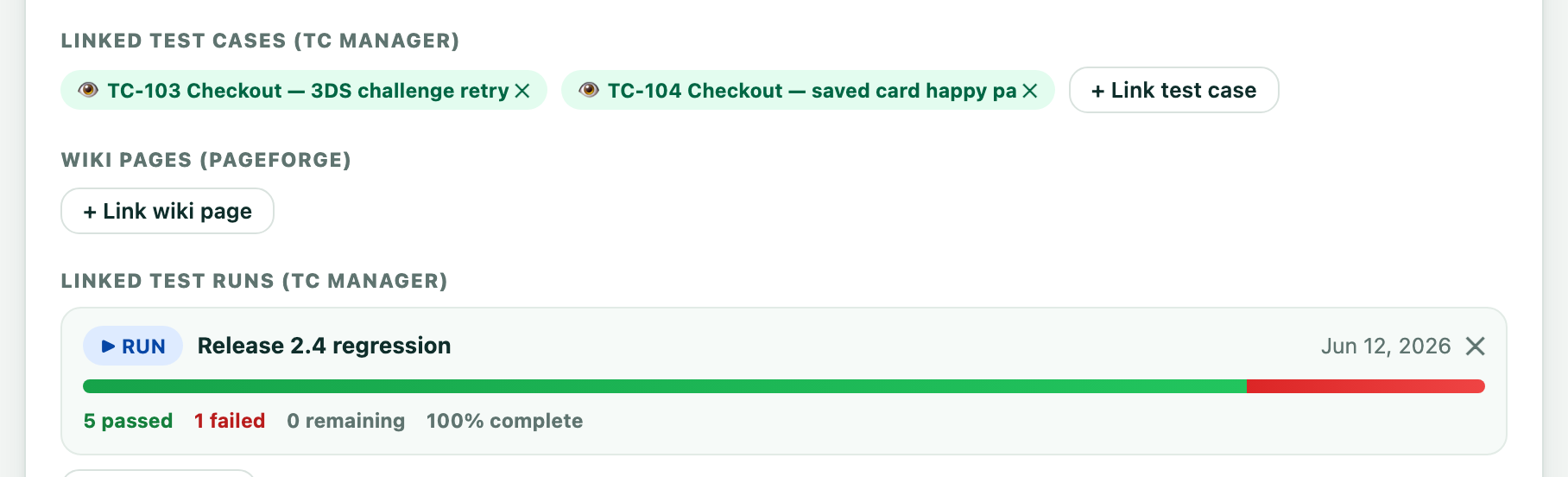
Test runs show up right inside the ticket

Open a bug in SprintDeck and the whole QA story is already there — no link-chasing, no "what's the latest?" pings.

  • Linked test cases as one-click preview chips
  • Live run progress — 5 passed, 1 failed — updating as QA executes
  • The failing run filed this very bug, steps and logs attached
SprintDeck ticket showing linked CaseRack test cases and a live test run progress bar
SprintDeck → PageForge

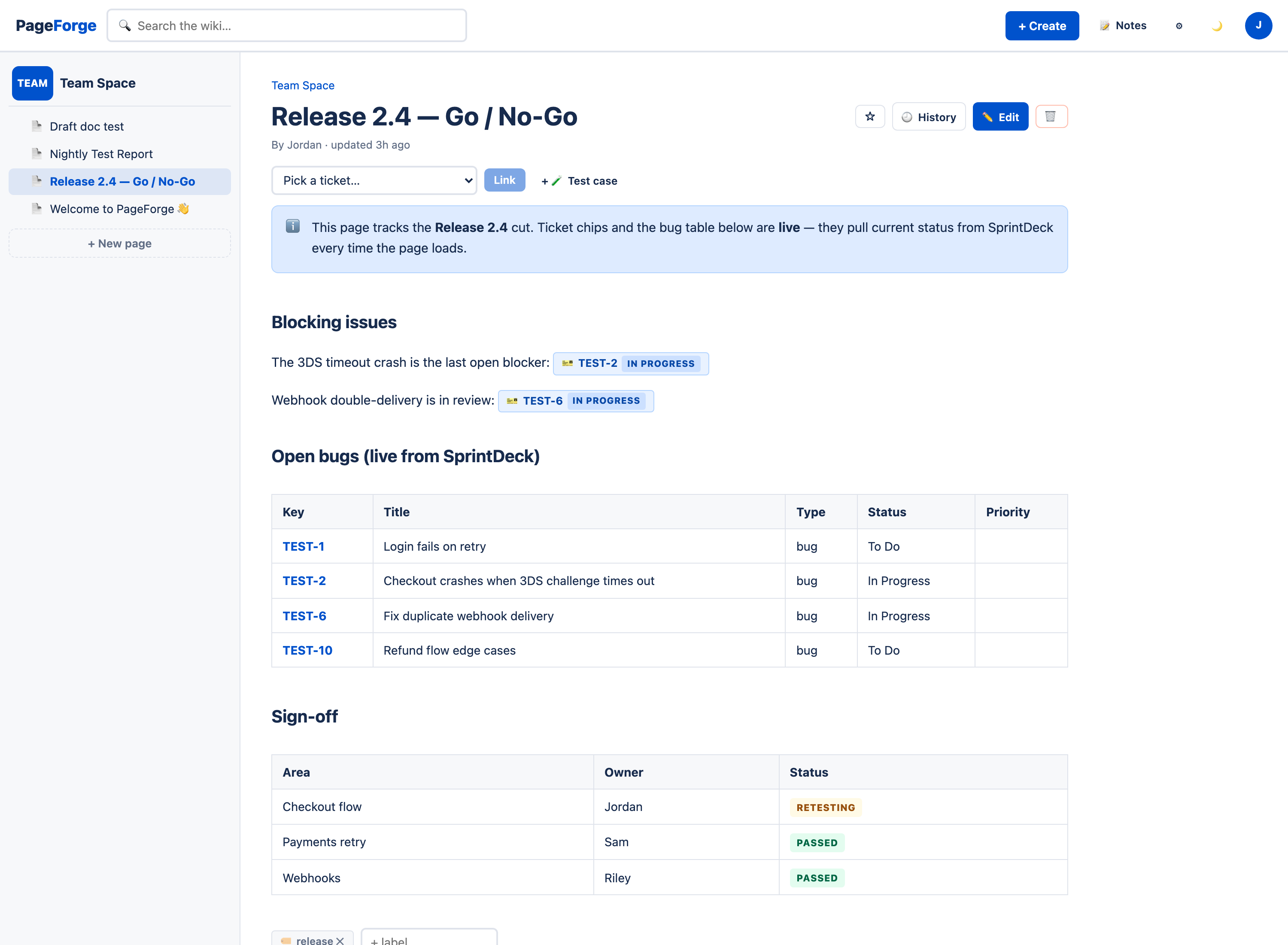
Wiki pages that read live from the tracker

This release page was written once. The ticket chips and the bug table query SprintDeck on every load — it can't go stale.

  • Inline ticket chips with live status
  • Filtered issue report tables that update themselves
  • Wiki pages link back onto tickets and test cases
PageForge wiki page embedding live SprintDeck ticket chips and a live bug report table
Why It Matters

Disconnected tools cost you context

Every copy-paste between your tracker, test tool, and wiki is a place where truth gets lost. Integration isn't a nice-to-have — it's how small teams move like big ones.

"Which ticket was this test for again?" Traceability you can prove

Every requirement links to its test cases, every test result to its run, every failure to its defect. Coverage reports show exactly what's tested — and what isn't.

"The wiki says it works. The wiki is from March." Docs that can't go stale

Ticket chips and report tables embedded in PageForge pull live status. When the sprint moves, the documentation moves with it — automatically.

"Five tabs, four logins, three copies of the truth." One account, one feed, one bill

Single sign-on across every app, one suite-wide activity stream, and one subscription that covers it all. Less glue, more shipping.

The life of a bug — without leaving the suite

From red pipeline to documented fix, with full context at every hop.

1
CI pushes results

Your pipeline posts JUnit results into a CaseRack run. A test fails.

2
One-click defect

The failure files a SprintDeck bug — steps, preconditions & logs attached.

3
Fix with context

The dev sees the linked test case and live run status right inside the ticket.

4
Docs update themselves

The wiki's release page shows the ticket green and the nightly report passing.

More From Us

Two more standalone products

Not part of the TitanForge suite — sold separately, own logins, own pricing. But built by the same team, with the same care.

NF

NoteRack

Notes, tasks & clips
NoteRack dashboard

Markdown notes with voice memos, sketches, OCR search, web clipper, and tasks. Fast capture, great search.

Open NoteRack →
FF

FeatureFlag

Flags, rollouts & A/B tests
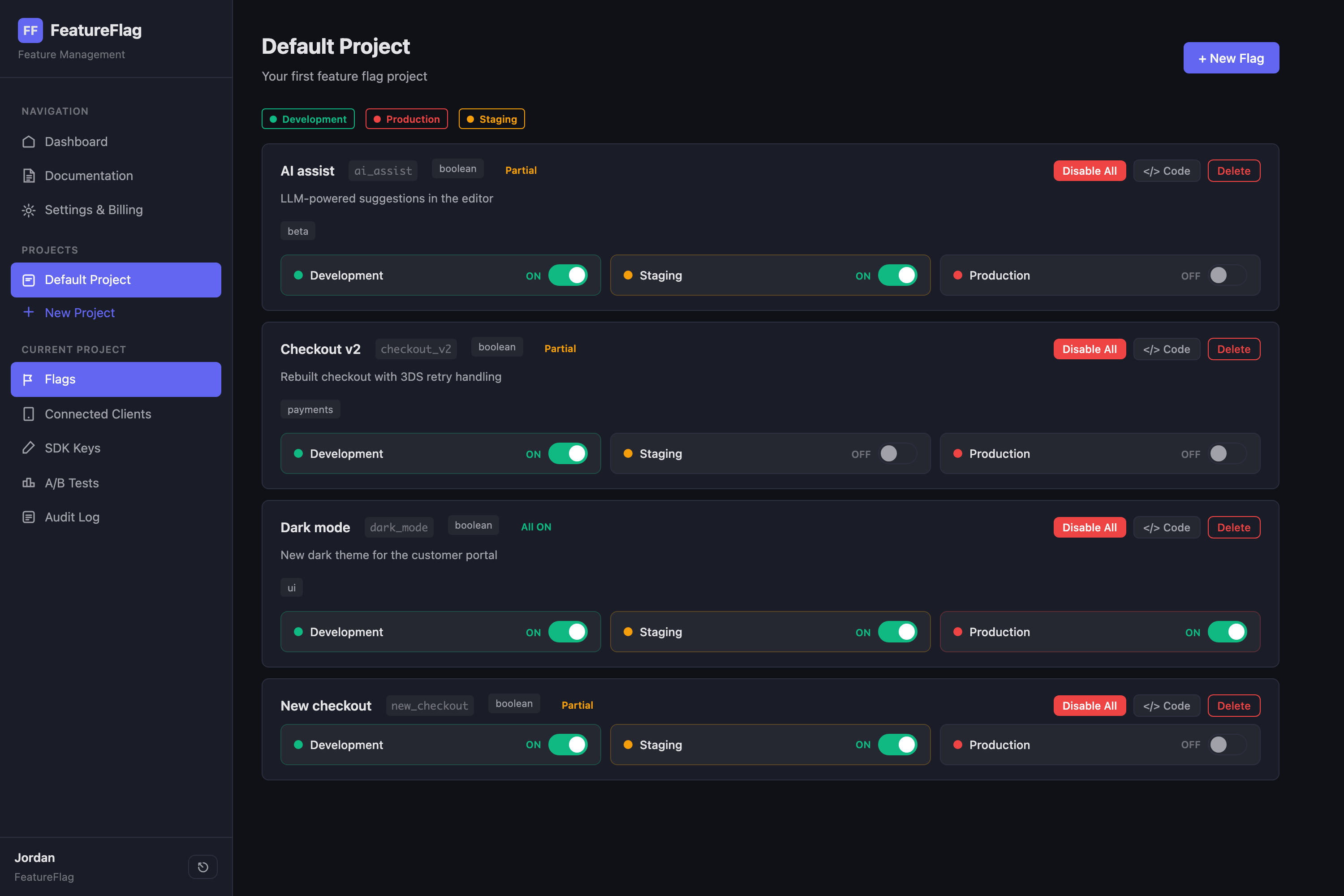
FeatureFlag project view

Per-environment toggles, targeting rules, percentage rollouts, and A/B tests. Live SDK updates over SSE.

Open FeatureFlag →

Want them connected to TitanForge? They're not — each runs independently with its own account and billing.

Pricing

Simple, seat-based pricing

Start free. Upgrade one app — or unlock everything with the Suite.

Free

$0
forever · up to 2 users
  • All three apps included
  • Generous starter limits
  • Cross-app linking & SSO

Single App

$45
per month · 5 users · per app
  • Unlimited projects & content
  • Pro features for that app
  • Seat tiers up to 50 users
BEST VALUE — SAVE 47%

TitanForge Suite

$95
per month · 5 users · all 4 apps
  • Everything, everywhere
  • One subscription, one invoice
  • Buy from inside any app
  • Yearly: 2 months free

Larger team? Seat tiers cover 5 → 10 → 25 → 50 users. All plans include every integration.

FAQ

Questions, answered

Is TitanForge a Jira and Confluence alternative?

Yes. SprintDeck covers agile boards, sprints, and issue tracking (with a Jira-compatible API), while PageForge is a Confluence-style team wiki with spaces, templates, and version history. They come connected out of the box.

Can TitanForge replace TestRail?

CaseRack is a full test case management platform: suites, runs, milestones, CI result ingestion (JUnit XML), flaky-test analytics, and scheduled reports — covering the core TestRail workflow with tighter issue-tracker integration.

Is there a free plan?

Yes — all three apps are free for up to 2 users with generous limits, no credit card required. Paid plans are seat-based, and the TitanForge Suite unlocks everything with one subscription.

How are the apps connected?

One account signs you into all three apps. Tickets link to test cases with live run progress, failed tests file defects automatically, wiki pages embed live ticket status, and one activity feed covers everything.

Can CI pipelines push results into TitanForge?

Yes. CaseRack ingests JUnit XML or JSON results from Jenkins, GitHub Actions, Bitrise or any CI via tokenized REST endpoints, and PageForge accepts docs and test reports through a Confluence-compatible content API.

Stop gluing tools together.

Your boards, tests, docs, and notes — already talking to each other.

Where do you want to start?

Pick any app — one free account works across all four.
Sign in to one and the rest log you in automatically.